
The Daily Development Cycle
The Feedback Loop
The daily cycle is built around a feedback loop between Product and Engineering. This isn’t a one-way pipeline where Product throws requirements over a wall and Engineering delivers. It’s a continuous negotiation where either side can push back, request clarification, or refine scope.
The loop has six stages:
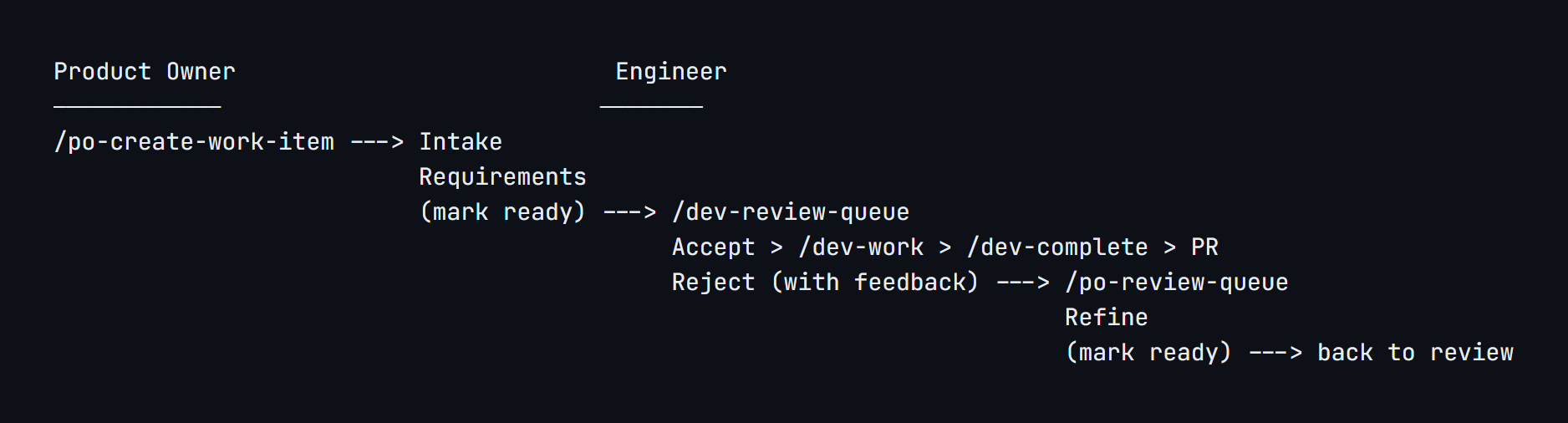
The key design decision: rejections are first-class. When an engineer rejects an issue, the system routes it back to the product owner with specific feedback, automatically reassigns it, and moves it back to the Requirements gate. The mechanical overhead (reassignment, label changes, status tracking, audit trail) is handled. The humans can focus on the actual conversation.
That conversation might be asynchronous through issue comments, or it might be a quick Teams call to talk through the feedback in real time. The goal isn’t to eliminate human interaction. It’s to make human interaction productive. Part of getting our cycle time down from 55 hours to 1.3 was more frequent, shorter sync calls between engineering and product owners, not fewer. The system removed the friction that made those conversations necessary for logistics (“what’s the status of X?”) so they could focus on substance (“here’s what I need from the acceptance criteria”).
Creating Work: The Product Owner Experience
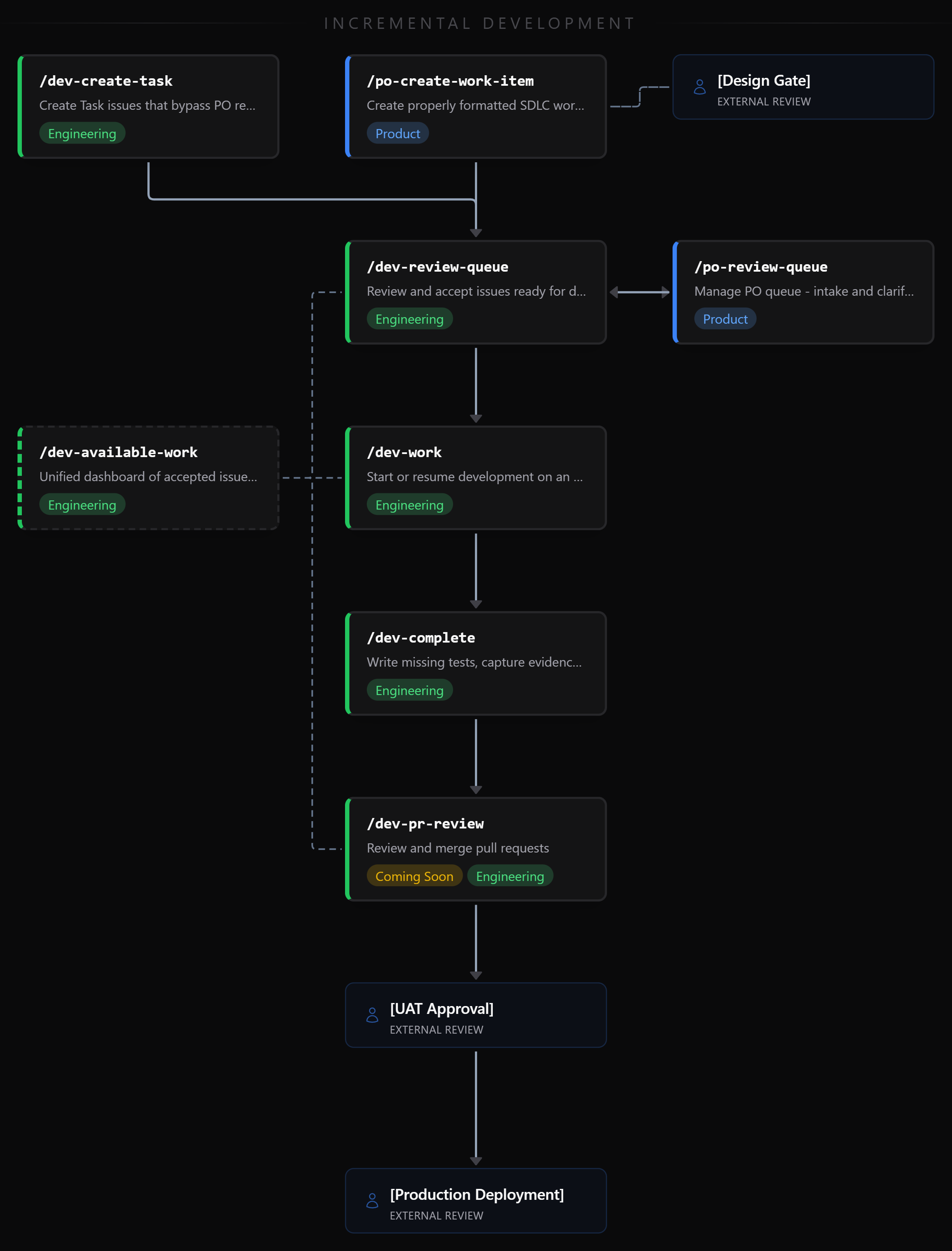
A product owner creates work by running /po-create-work-item. The skill handles three issue types (Feature, Bug, Defect) with different collection flows for each. Engineering-oriented Tasks are created separately via /dev-create-task and bypass product review, as described in Part 2.
For a feature, the skill collects a title, summary, and acceptance criteria. The interesting part is how it handles acceptance criteria. The product owner doesn’t need to write in Given/When/Then format. They describe what should happen in natural language:
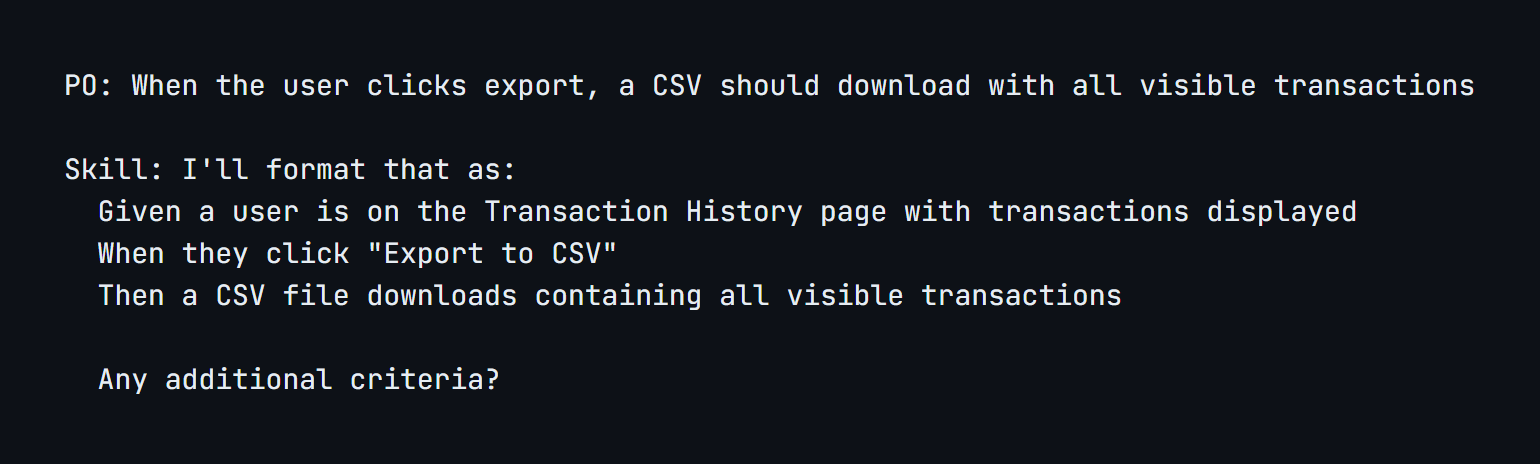
The skill translates casual descriptions into structured, testable criteria. This is the semantic guardrail in action: the product owner thinks in business terms, the system produces engineering-ready output.
Quality Validation
Before the issue is created, the skill invokes a quality validator subagent that checks the issue against SDLC standards. It looks for vague language (“handles errors gracefully”), untestable criteria, missing sections, and structural problems. If it finds issues, it reports them with specific suggestions and offers to help refine.
This validation happens at creation time, not at review time. The product owner gets immediate feedback and can fix problems before an engineer ever sees the issue. That saves a round trip through the rejection loop for the most common problems.
Partial Requirements
Not every issue arrives fully formed. The skill supports incremental creation. A product owner with a rough idea can create an issue with just a title and summary. It stays in Intake until they add acceptance criteria and mark it ready. If the work needs design input, product flags it during creation. Prototypes, Figma mockups, proof-of-concept work, these are inputs that inform the issue before it reaches engineering, not a gate between acceptance and development. We support a /refs/ folder in each project repository where product, design, and other stakeholders can deposit artifacts (mockups, prototypes, research documents) that are available to all subsequent stages.
One thing that isn’t immediately obvious: you can pass semantic arguments to skills. Running /po-create-work-item please check the prototype in references and help me create an issue to implement the dark mode styling works exactly as you’d expect. The skill reads the prototype from /refs/, understands the context, and uses it to inform the issue creation. Skills aren’t rigid CLI commands with positional parameters. You talk to them. By the time an engineer sees an issue in the review queue, any required design work is already attached. The system doesn’t force completeness upfront, but it won’t let incomplete work proceed to engineering.
Checking the Queue: The Product Owner’s View
/po-review-queue shows the product owner everything that needs their attention, across all repositories in the organization. Issues are grouped by repository and categorized: items returned by engineers needing clarification first (these are blocking someone), then intake items still being refined.
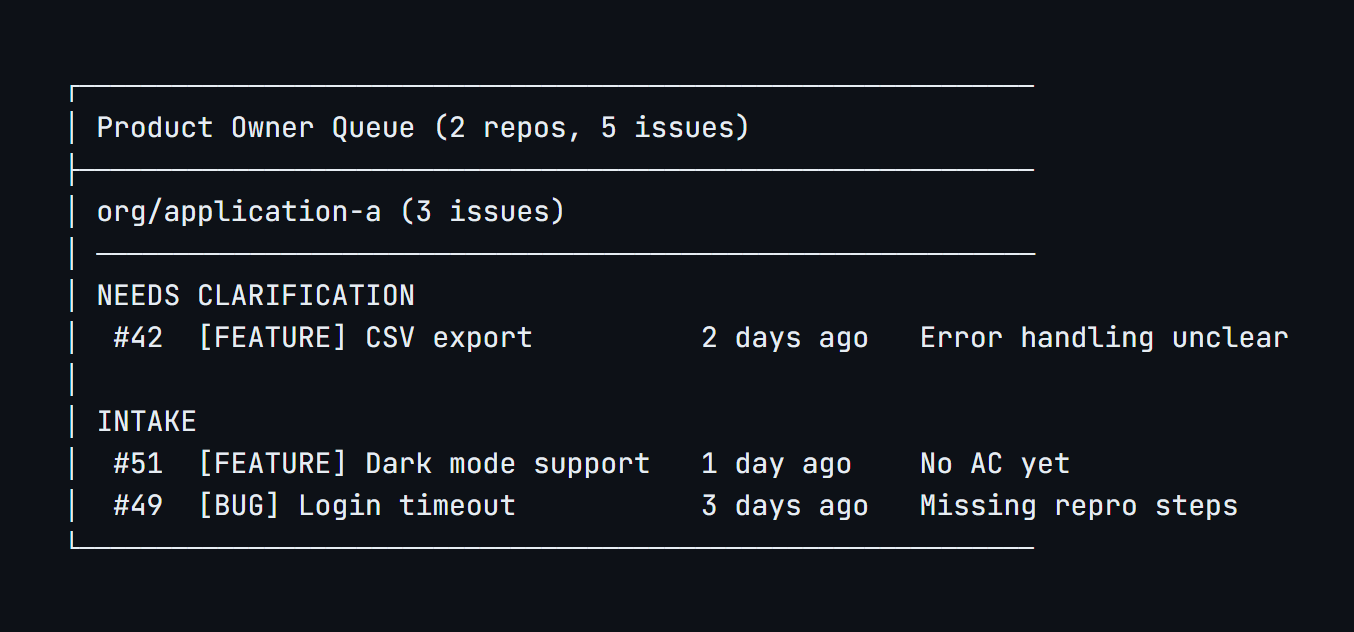
When the product owner selects an issue that was returned for clarification, the skill shows the engineer’s feedback and guides them through adding the missing pieces. Once refined, it removes the needs-clarification label, adds ready, removes the PO’s assignment, and posts a resolution comment documenting what changed. The audit trail is automatic.
Reviewing Work: The Engineer’s View
/dev-review-queue is the engineer’s entry point. It queries for issues with the ready label that haven’t been accepted yet, sorts by priority (defects first, then bugs, then features), and presents the highest-priority item.
Before showing the issue, the skill does three things automatically:
-
Quality validation: The same validator subagent that checked the issue at creation runs again from the engineer’s perspective. Missing priority labels, untestable criteria, and vague language get flagged.
-
Interdependency analysis: The skill scans all issues in the queue for references to each other, looking for direct dependencies (“blocked by #45”) and inferred relationships (overlapping technical context). This helps the engineer decide whether to take an issue that depends on unfinished work.
-
Full content display: Every acceptance criterion is shown verbatim, not summarized. The engineer sees exactly what Product wrote, in Given/When/Then format, before making a decision.
The engineer has four options: accept the issue (with sizing confirmation, for now), accept with comments (documenting rationale or concerns), reject with feedback (which routes back to the product owner), or skip to the next item.
When the engineer finishes their session, the skill shows a summary: how many issues were accepted, rejected, and skipped, with the specific feedback posted on rejected items. The product team doesn’t need to ask what happened. The data is in the issues.
Building: The Development Workflow
/dev-work takes an accepted issue and sets up everything the engineer needs to begin. “Begin” in this context is closer to supervising than building. The engineer directs Claude Code, reviews its output, makes judgment calls about approach, and ensures the result matches the requirements. The AI writes the vast majority of the code. The engineer ensures it’s the right code.
The skill creates a branch following a naming convention that embeds the issue number (feature/issue-42-csv-export), links the branch to the issue in GitHub, assigns the issue to the engineer, and then enters plan mode.
Test Plan Before Code
This is worth calling out because it’s something the industry has aspired to for decades and rarely achieved in practice. Every methodology advocates for defining verification criteria before implementation. In most enterprises, the pressure to ship wins every time.
We made it structural. The skill doesn’t suggest thinking about testing first. It generates the test plan first, before any implementation code exists. A test planning subagent analyzes the acceptance criteria and produces a plan covering happy paths, boundary conditions, failure modes, and implicit assumptions the criteria don’t explicitly state. The engineer reviews and adjusts the plan. Only then does the implementation plan get developed, informed by the verification scenarios.
This isn’t test-driven development in the traditional sense. We’re not opinionated about what specific programmatic tests are necessary at the unit or integration level. What we’re defining upfront is how we’ll verify the work is done: what scenarios need to pass, what behaviors need to be observable, what edge cases need to be covered.
One concept that’s been challenging for people to internalize is the difference between Claude Code as a manual tester and Claude Code writing test automation. These are distinct activities. When /dev-complete operates Chrome DevTools to navigate the application, click buttons, and verify that the expected outcomes appear on screen, that’s Claude Code performing functional testing, the same way a human QA tester would. When it writes unit tests or integration tests as part of the implementation, that’s writing automated test code that runs in CI. Both happen during our workflow, but they serve different purposes and the test plan informs both. For programmatic test automation specifically, the agent draws on three sources: the test plan (what needs to be verified), a dedicated testing subagent that evaluates what adequate coverage looks like for the specific work, and the project’s testing configuration. Each project maintains a .claude/testing.md file that defines its test frameworks, file patterns, run commands, and discovery hints. A .NET API project with xUnit conventions gets different test automation than a React frontend with Vitest. If the configuration file doesn’t exist, the agent auto-detects frameworks from project files, but explicit configuration means consistent, predictable behavior across sessions and engineers. The project context drives the approach, not a global standard.
The engineer approves the combined plan before any code is written. This is a deliberate inversion of the typical flow where tests come after implementation (if they come at all).
One practical detail: the skill writes all issue context (acceptance criteria, comments, technical context) to a persistent plan file. Claude Code sessions can lose context during long work sessions. The plan file ensures the requirements survive context resets, so the agent can always refer back to what it’s building against.
Completing: Validation Before PR
/dev-complete is the most comprehensive skill in the system. It validates that development is actually done before creating a pull request.
The validation runs in stages:
AI Code Review. The skill reviews code changes against acceptance criteria. Does every criterion have a corresponding implementation? Are there obvious bugs or security issues? A SQL injection in the export endpoint gets caught here, not in human review. If the code fundamentally isn’t aligned with requirements, the skill flags it before proceeding further.
Test Verification. For each acceptance criterion, the skill verifies that a corresponding test exists and runs it. If coverage is missing or tests fail, the skill stops and reports what needs to be fixed. The engineer addresses the gaps and runs /dev-complete again. This is deliberate: test coverage decisions are judgment calls, not something the agent should silently resolve.
Functional Validation. The skill validates each acceptance criterion against the running system. Depending on the work, this might mean operating Chrome DevTools to navigate the application and verify UI behavior, calling API endpoints and checking responses, querying a database to confirm data was persisted correctly, or whatever else the criteria require. Browser validation is the most common case (and requires the most tooling, via Chrome DevTools MCP), but the approach adapts to what the acceptance criteria actually describe.
Documentation. This step solves two historically hard problems systematically, without anyone needing to remember to do it. The first is keeping human documentation up to date. READMEs, architecture docs, setup guides. Every team knows these drift from reality within weeks of being written. A documentation agent analyzes what was just built and updates project documentation directly where the changes are relevant. It doesn’t ask for permission or propose changes for review. It makes the updates, stages them, and reports what it did. The second is keeping agent documentation up to date. CLAUDE.md is the file that teaches the AI about the project’s conventions, patterns, gotchas, and context. Throughout the validation process, the skill tracks non-obvious learnings: a formula that uses 360-day year convention, a config change that requires a server restart, an empty state that shows a message instead of a redirect. These learnings get proposed as CLAUDE.md updates for the engineer to review, since changes to agent instructions warrant human judgment. Because this runs at the end of every issue workflow, documentation stays current as a byproduct of shipping code. It’s not a separate task that someone needs to remember.
Throughout the process, the agent tracks discrepancies and decisions, presenting them in a final summary at the end of the workflow. Documentation gaps get addressed directly by the documentation agent. When the skill encounters blocking issues (missing test coverage, failing tests, code that doesn’t align with requirements), it stops and reports what needs to be fixed rather than guessing. This pattern is consistent across all of our skills: work through the process, handle what can be handled, stop for things that require human judgment, and give the engineer a clear picture of what happened and what needs their attention.
The Validation Report as Compliance Evidence
Only after all stages pass does the skill create the pull request. The PR body includes a comprehensive validation report documenting every check that was run, the method used, and the results for each acceptance criterion.
Consider how testing evidence works in most organizations today: an issue moves from “In Testing” to “Done” and the only proof anyone has is the status change and maybe a comment that says “LGTM.” If an auditor, a customer, or a production incident asks “how do you know this was tested?” the answer is “someone moved the card.”
Our validation report provides structured evidence automatically, as a byproduct of the development workflow. Every PR in our system contains a record of what was tested, how it was tested, and whether it passed. The report includes screenshots from Chrome DevTools and output from API and database verification injected directly into the PR body. Visual and data proof, attached to the PR, generated without anyone thinking about compliance documentation.
For an auditor, that’s not a status report someone compiled. That’s machine-generated evidence tied to the specific code change, the specific requirement, and the specific test that verified it. For a reviewer, it means they don’t need to re-validate from scratch. They can focus on judgment calls: does the approach make sense? Does it fit the codebase? Are there concerns the AI didn’t catch?
What We’re Building Next
We’re evolving /dev-available-work into a general-purpose “what should I do next?” command. Currently it shows accepted issues ready for development. The plan is to expand it to also surface issues available for review and pending pull requests from teammates. One command, three types of work, covering the full daily rhythm.
We’re also building /dev-pr-review to guide the human PR review process. By the time a PR exists, the AI has already done code review, test validation, and functional verification. The human review skill will focus on the things humans are good at: architectural judgment, approach fitness, and concerns the AI wouldn’t surface. The emphasis is on human interaction, not duplicating analysis that’s already been done.
The Accountability Loop
The system creates accountability by handling the logistics so people can focus on the work. Product knows when engineering has rejected an issue because the feedback appears in their queue with specific comments. Engineering knows when product has refined an issue because it reappears in the ready queue with a resolution comment documenting what changed. Leadership knows where things are stuck because Signal shows gate transitions and time-in-stage across all teams.
Nobody manually updates a status field. Nobody compiles a status report. The process emits signals as a byproduct of doing the work. And when people need to talk (which they should, and do), the conversation starts with shared context instead of “so where are we on this?”
What’s Coming Next
The final post in this series covers what we’ve learned: what the data shows, what surprised us, what we’d do differently, and where the real bottlenecks are now that implementation isn’t one of them.